
Simple Balance Sheet Template Excel For Small Business
A balance sheet is a snapshot of your company’s assets, liabilities, and equity at a specific point in time. Think of it as a financial health check, showing what your business owns (assets), what it owes (liabilities), and the owner’s stake in the company (equity). For small businesses, especially those just starting out, maintaining a simple and accurate balance sheet is crucial for understanding financial performance, making informed decisions, and attracting potential investors or lenders.
Why Use an Excel Template?
While sophisticated accounting software exists, Excel offers a cost-effective and accessible solution for creating a balance sheet, especially for small businesses with limited budgets. Excel is readily available, user-friendly, and allows for customization. A well-designed Excel template can automate calculations, improve accuracy, and present financial information in a clear and organized manner.
Key Components of a Simple Balance Sheet Template in Excel
The fundamental accounting equation that the balance sheet adheres to is: Assets = Liabilities + Equity. Let’s break down each component and how to incorporate them into your Excel template:
1. Assets
Assets represent what your business owns. They are resources that have future economic value. Assets are typically categorized as either:
- Current Assets: Assets that can be converted to cash within one year. Examples include:
- Cash: Includes checking accounts, savings accounts, and petty cash.
- Accounts Receivable: Money owed to your business by customers for goods or services already delivered.
- Inventory: Raw materials, work-in-progress, and finished goods held for sale.
- Prepaid Expenses: Expenses paid in advance, such as rent or insurance.
- Non-Current Assets (Fixed Assets): Assets with a useful life of more than one year. These are used to generate revenue over the long term. Examples include:
- Property, Plant, and Equipment (PP&E): Land, buildings, machinery, vehicles, and furniture.
- Intangible Assets: Assets that lack physical substance but have value, such as patents, trademarks, and copyrights.
Creating the Asset Section in Excel:
- In your Excel sheet, create a heading “Assets”.
- Beneath it, create subheadings for “Current Assets” and “Non-Current Assets”.
- List each asset type (e.g., Cash, Accounts Receivable, Inventory) under the appropriate subheading in a separate row.
- In the adjacent column, enter the corresponding dollar value for each asset.
- Use the SUM function in Excel to calculate the total current assets and total non-current assets. For example: `=SUM(B2:B5)` to sum the values in column B from rows 2 to 5.
- Finally, calculate the total assets by summing the total current assets and total non-current assets.
2. Liabilities
Liabilities represent what your business owes to others. They are obligations to transfer assets or provide services in the future. Liabilities are generally categorized as:
- Current Liabilities: Obligations that are due within one year. Examples include:
- Accounts Payable: Money owed to suppliers for goods or services received.
- Salaries Payable: Wages owed to employees.
- Short-Term Loans: Loans due within one year.
- Unearned Revenue: Payments received from customers for goods or services not yet delivered.
- Non-Current Liabilities (Long-Term Liabilities): Obligations that are due beyond one year. Examples include:
- Long-Term Loans: Loans due in more than one year.
- Mortgages Payable: Loans secured by real estate.
Creating the Liabilities Section in Excel:
- Beneath the “Assets” section in your Excel sheet, create a heading “Liabilities”.
- Beneath it, create subheadings for “Current Liabilities” and “Non-Current Liabilities”.
- List each liability type (e.g., Accounts Payable, Salaries Payable, Short-Term Loans) under the appropriate subheading in a separate row.
- In the adjacent column, enter the corresponding dollar value for each liability.
- Use the SUM function in Excel to calculate the total current liabilities and total non-current liabilities.
- Finally, calculate the total liabilities by summing the total current liabilities and total non-current liabilities.
3. Equity
Equity represents the owner’s stake in the business. It’s the residual value of assets after deducting liabilities. In a simple balance sheet for a small business, equity typically includes:
- Owner’s Equity (or Retained Earnings): The accumulated profits of the business that have not been distributed to the owner(s). This can also include capital contributed by the owner(s).
Creating the Equity Section in Excel:
- Beneath the “Liabilities” section in your Excel sheet, create a heading “Equity”.
- List “Owner’s Equity” or “Retained Earnings” as the line item. If the owner has contributed capital, you may have separate lines for “Owner’s Capital Contribution” and “Retained Earnings”.
- In the adjacent column, enter the corresponding dollar value for the equity.
- Calculate the total equity. If you have multiple equity line items, use the SUM function.
4. Verifying the Accounting Equation
After creating the Assets, Liabilities, and Equity sections, the most crucial step is to verify that the accounting equation (Assets = Liabilities + Equity) balances. In your Excel template:
- Create a cell labeled “Total Liabilities and Equity”.
- In the adjacent cell, use the SUM function to add the total liabilities and total equity. For example: `=SUM(B20:B21)` where B20 and B21 contain the total liabilities and total equity respectively.
- Compare this value with the “Total Assets” value. If they match, your balance sheet is balanced. If they don’t match, you have an error and need to review your data and calculations.
Example Excel Template Layout
Here’s a possible layout for your simple balance sheet template in Excel:
| | [Company Name] | | |---------------|--------------------------|----------------| | | Balance Sheet | [Date] | |---------------|--------------------------|----------------| | **Assets** | | | | Current Assets | | | | Cash | | [Dollar Value] | | Accounts Receivable | | [Dollar Value] | | Inventory | | [Dollar Value] | | Prepaid Expenses | | [Dollar Value] | | **Total Current Assets** | | [Calculated Sum] | | Non-Current Assets| | | | Property, Plant & Equip. | | [Dollar Value] | | **Total Non-Current Assets**| | [Calculated Sum] | | **Total Assets**| | [Calculated Sum] | | | | | | **Liabilities** | | | | Current Liabilities | | | | Accounts Payable| | [Dollar Value] | | Salaries Payable| | [Dollar Value] | | Short-Term Loans| | [Dollar Value] | | Unearned Revenue | | [Dollar Value] | | **Total Current Liabilities**| | [Calculated Sum] | | Non-Current Liabilities| | | | Long-Term Loans | | [Dollar Value] | | Mortgages Payable| | [Dollar Value] | | **Total Non-Current Liabilities**| | [Calculated Sum] | | **Total Liabilities**| | [Calculated Sum] | | | | | | **Equity** | | | | Owner's Equity| | [Dollar Value] | | **Total Equity**| | [Calculated Sum] | | | | | | **Total Liabilities and Equity**| | [Calculated Sum] |
Tips for Using Your Balance Sheet Template
- Consistency is Key: Update your balance sheet regularly (e.g., monthly, quarterly) to track your business’s financial performance over time.
- Accuracy Matters: Ensure the data you enter is accurate and up-to-date. Double-check your calculations and reconcile your balances with bank statements and other financial records.
- Customization: Tailor the template to fit your specific business needs. Add or remove line items as necessary to reflect the assets, liabilities, and equity relevant to your operations.
- Seek Professional Advice: While Excel templates are helpful, consider consulting with an accountant or bookkeeper for more complex financial situations or for guidance on interpreting your balance sheet.
- Utilize Excel Features: Take advantage of Excel’s features such as conditional formatting to highlight key areas or potential issues. You can use data validation to prevent errors in data entry.
Benefits of Using a Balance Sheet
* **Financial Health Overview**: Quickly see your company’s financial position at a glance. * **Decision Making**: Make informed decisions about investments, borrowing, and spending. * **Performance Tracking**: Monitor changes in assets, liabilities, and equity over time. * **Attracting Investors/Lenders**: Provides a clear picture of your company’s financial stability. * **Financial Planning**: A crucial tool for forecasting and planning future financial activities.
By using a simple balance sheet template in Excel, small businesses can gain valuable insights into their financial health, make informed decisions, and improve their chances of long-term success. Remember to keep the template updated regularly, ensure accuracy, and seek professional advice when needed.
 1024×812 balance sheet template small business small business from www.heritagechristiancollege.com
  809×787 balance sheet template small business sheet small business from www.heritagechristiancollege.com
  1024×793 balance sheet template small business balance sheet from www.heritagechristiancollege.com
  936×831 balance sheet template small business business balance from www.heritagechristiancollege.com
 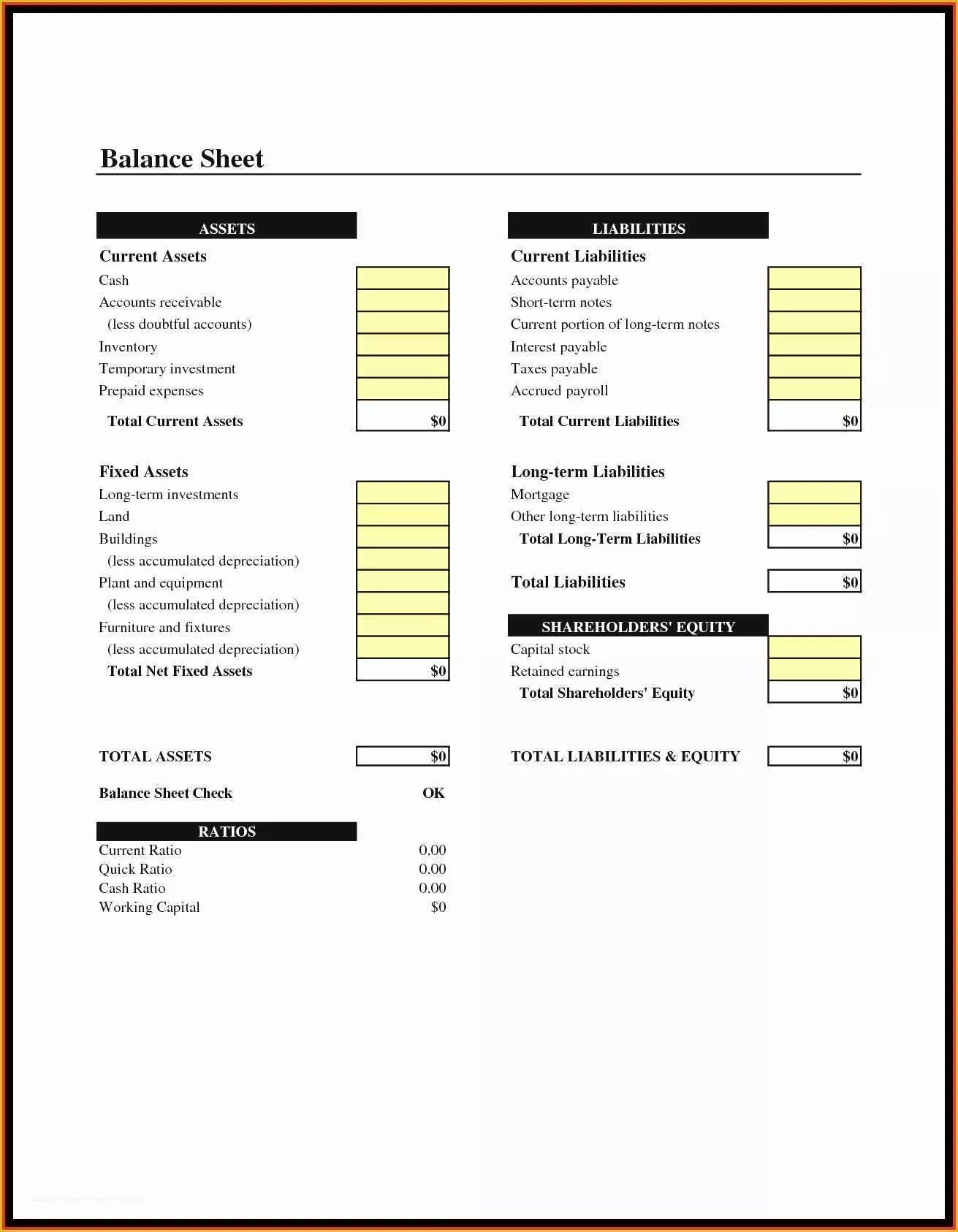 1311×1686 balance sheet template small business simple balance sheet from www.heritagechristiancollege.com
  872×692 balance sheet template small business balance sheet from www.heritagechristiancollege.com
 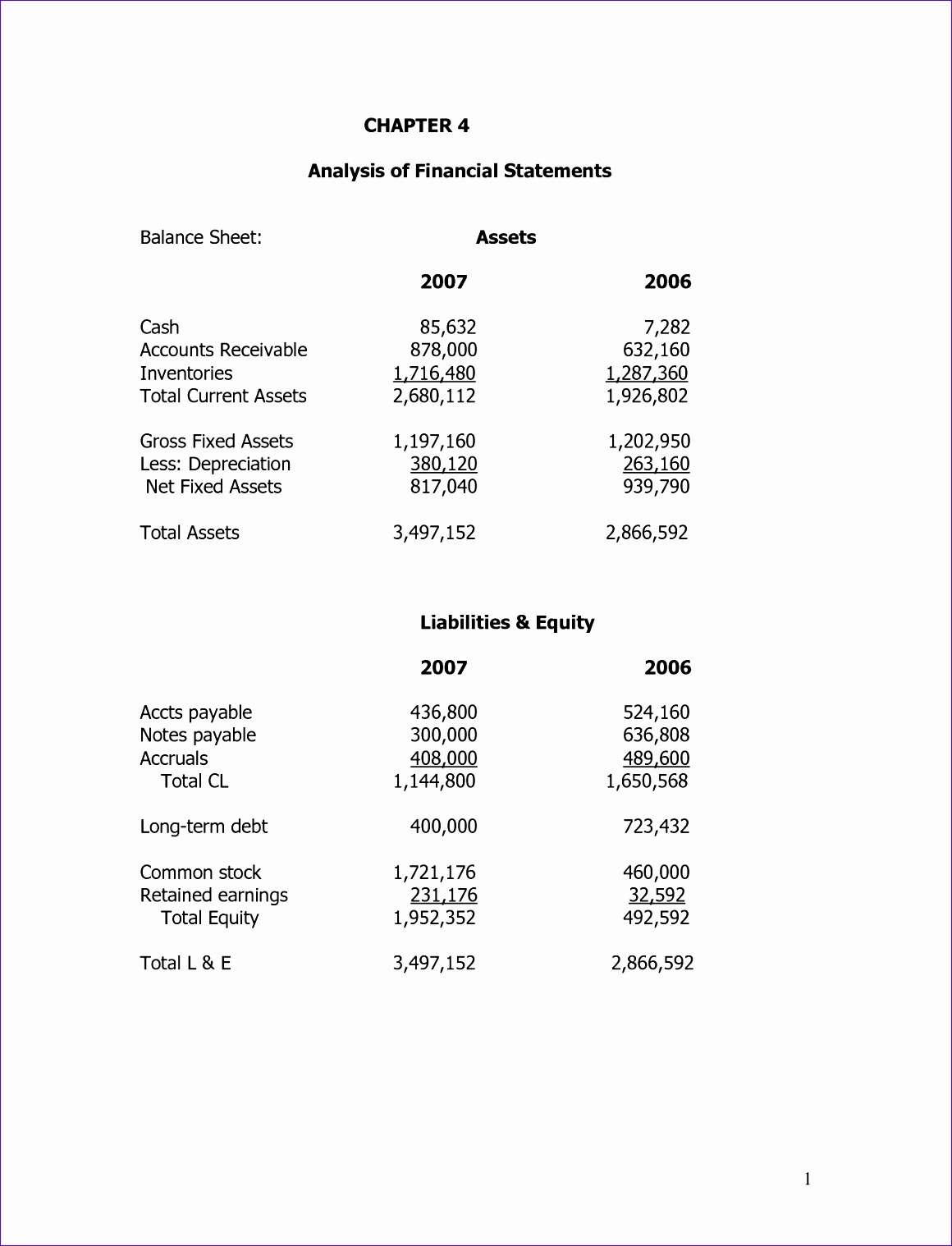 1160×1518 small business balance sheet template excel excel templates from www.exceltemplate123.us
  1275×1651 small business balance sheet template excel rtf from freedownloads.net
  671×1081 balance sheet template small business sample balance sheet from www.heritagechristiancollege.com
  800×600 business balance sheet template excel templates from www.exceltemplates.com
  929×970 sample balance sheet small business db excelcom from db-excel.com
  895×631 balance sheet small business db excelcom from db-excel.com
 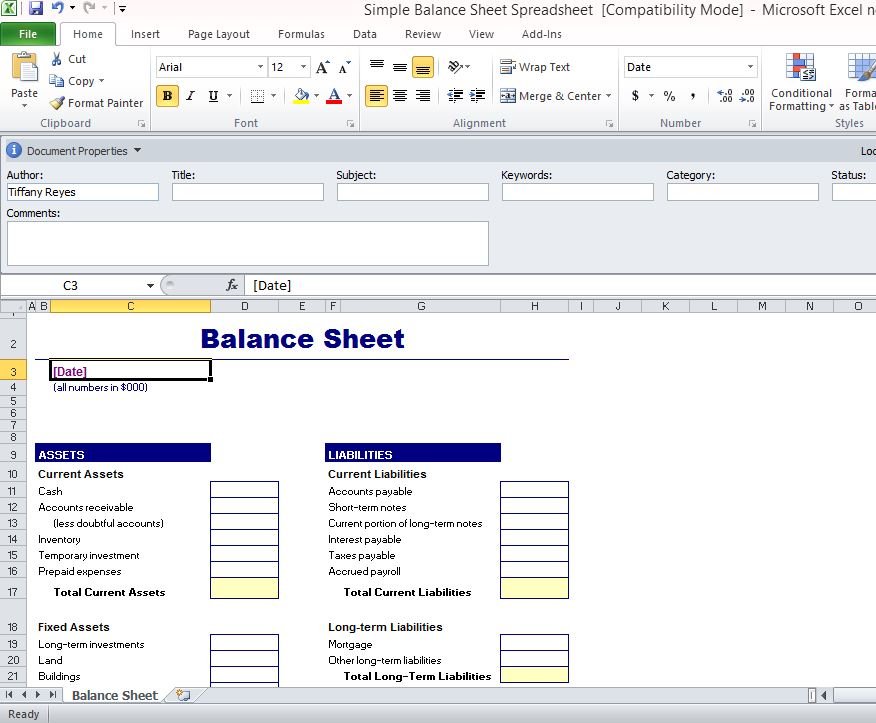 876×723 simple balance sheet template excel from www.free-power-point-templates.com