
IT Department Memo Format
IT Department Memo Format: A Comprehensive Guide
Memos within an IT department serve as critical conduits for information dissemination, task assignment, policy updates, and project coordination. A well-structured memo ensures clarity, efficiency, and professionalism. Adhering to a standardized format enhances readability and comprehension, minimizing ambiguity and promoting prompt action. This guide details the essential components of an effective IT department memo, providing best practices and examples for various scenarios.
Key Elements of an IT Department Memo
- Heading Block: This is the first section of the memo and provides essential identification. It usually includes:
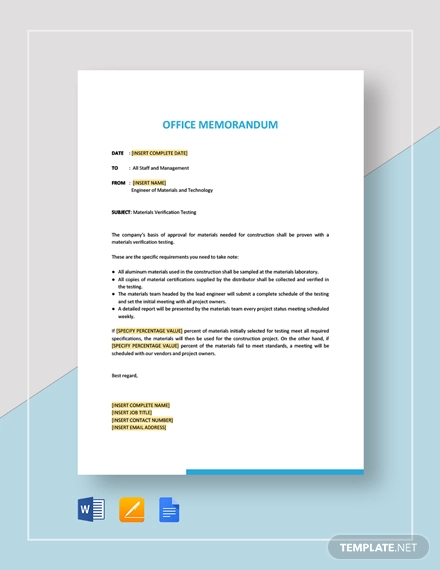
- MEMORANDUM: Bold and centered at the top of the page, clearly indicating the document’s purpose.
- TO: List all recipients of the memo. Be specific (e.g., “All Network Engineers” or “John Doe, Head of Security”). If sending to a large group, consider using “All IT Staff” or a specific distribution list. For sensitive information, avoid broad distribution and address individuals directly.
- FROM: Your name and title. This establishes your authority and accountability for the information presented. For example, “Jane Smith, Senior Systems Administrator.”
- DATE: The date the memo was issued. Use a consistent date format (e.g., YYYY-MM-DD or Month Day, Year).
- SUBJECT: A concise and descriptive summary of the memo’s content. This allows recipients to quickly understand the memo’s purpose and prioritize accordingly. Examples: “Scheduled Server Maintenance,” “New Password Policy Implementation,” “Upcoming Security Audit,” “Project Phoenix Status Update.”
- Introduction: The opening paragraph should clearly state the memo’s purpose and provide context for the reader.
- State the Main Point: Immediately inform the reader what the memo is about. Avoid ambiguity and get straight to the point.
- Provide Background (if necessary): Briefly explain the situation that led to the memo. This is particularly important if the topic is complex or unfamiliar to the recipients.
- Set the Tone: The tone should be professional and appropriate for the subject matter. Choose your words carefully to avoid misinterpretations.
- Body: This section contains the main content of the memo.
- Organize Information Logically: Use headings, subheadings, bullet points, and numbered lists to break down complex information into manageable chunks.
- Provide Supporting Details: Back up your claims with facts, data, and examples. This adds credibility and helps recipients understand the rationale behind your message.
- Be Concise and Clear: Avoid jargon and technical terms that may not be understood by all recipients. Use simple, direct language and avoid unnecessary words.
- Call to Action (if applicable): Clearly state what you expect recipients to do after reading the memo. This could include attending a meeting, completing a task, reviewing a document, or implementing a new policy.
- Conclusion: Summarize the key points and reinforce the desired outcome.
- Summarize Key Information: Briefly reiterate the main points of the memo.
- Reiterate the Call to Action: Remind recipients of any required actions.
- Provide Contact Information: Include your contact information (phone number, email address) so recipients can easily reach you with questions or concerns.
- Express Appreciation (if appropriate): Thank recipients for their time and attention.
- Attachments (if applicable): List any documents that are attached to the memo.
- List Attachments Clearly: Clearly identify each attachment by name and brief description.
- Refer to Attachments in the Body: Mention the attachments in the body of the memo so recipients know when to refer to them.
Best Practices for IT Department Memos
- Know Your Audience: Tailor the language and content of the memo to the knowledge level and background of the recipients.
- Be Accurate and Truthful: Ensure all information presented is accurate and verifiable.
- Proofread Carefully: Before sending the memo, carefully proofread it for errors in grammar, spelling, and punctuation.
- Use a Professional Tone: Maintain a professional and respectful tone throughout the memo, even when addressing sensitive or critical issues.
- Maintain Confidentiality: Protect sensitive information and avoid disclosing confidential data in memos that are not properly secured.
- Use a Template: Create a standard memo template to ensure consistency and efficiency.
- Consider Email Alternatives: For quick updates or informal communication, consider using email or instant messaging instead of a formal memo. However, for formal announcements, policy changes, or important project updates, a memo is often the preferred method.
- Follow Company Policy: Adhere to your company’s guidelines for memo formatting and distribution.
Examples of IT Department Memo Topics
- Network Downtime Notification: Inform staff about scheduled network maintenance and potential downtime.
- Security Policy Update: Announce changes to the company’s security policies.
- New Software Implementation: Provide information about new software being installed on company computers.
- Phishing Awareness Training: Remind staff about the dangers of phishing and provide training resources.
- Project Kickoff Meeting: Announce the start of a new IT project and invite stakeholders to a kickoff meeting.
- Remote Work Guidelines: Communicate guidelines for employees working remotely.
- Data Backup Procedures: Outline the procedures for backing up important data.
- IT Help Desk Procedures: Detail the steps for contacting the IT help desk for support.
Conclusion
A well-formatted memo is a valuable tool for communication within the IT department. By adhering to the principles outlined in this guide, you can ensure that your memos are clear, concise, and effective, contributing to improved communication and collaboration within your team. Remember to adapt the format and content to suit the specific situation and audience, always striving for clarity and professionalism.
 390×505 memo samples from www.sample.net
  622×862 memo template word templates from www.wordstemplates.org
  1277×1652 technical memo template technical memo format memo formats from williamson-ga.us
  600×419 employee memo template word document downloads from www.template.net
  730×773 write effective memo format examples logrocket blog from blog.logrocket.com
  440×570 office memo examples from www.examples.com
  770×1024 department memo template pdffiller from www.pdffiller.com
  768×1024 memo template templates word excel from www.formsbirds.com
  1084×1403 memo format templates examples artofit from www.artofit.org
  1024×1446 memo samples format examples from www.template.net
  1200×1549 technical memo format from www.yumpu.com
  1200×1200 department memo template edit from www.template.net
  1275×1650 template internal office memo memorandum format sample intended from www.thegreenerleithsocial.org
  580×280 sample memo ms word google docs from www.sample.net
  1200×1200 memo templates examples edit templatenet from www.template.net
  768×1024 office memo template templates word excel from www.formsbirds.com
  1200×1701 general departmental memo format from www.yumpu.com
  600×730 technical memo template memo format word documents from williamson-ga.us
  972×1272 office memo hot sex picture from www.hotzxgirl.com