
Home Energy Usage Tracker Excel Template
Home Energy Usage Tracker Excel Template: A Comprehensive Guide
In an era of increasing environmental awareness and rising energy costs, understanding and managing your home energy consumption is crucial. A well-designed Home Energy Usage Tracker Excel template can be an invaluable tool, providing insights into your energy habits and empowering you to make informed decisions to reduce waste and save money.
Why Use an Excel Template for Energy Tracking?
While dedicated energy monitoring devices and apps offer convenience, an Excel template provides a customizable and cost-effective alternative. Here’s why it’s a worthwhile approach:
- Affordability: Excel is a widely available software. You likely already have it installed, eliminating the need for additional subscriptions or hardware purchases.
- Customization: Unlike pre-built apps, you have complete control over the template’s structure, categories, and calculations. You can tailor it to your specific needs and appliances.
- Data Ownership: Your energy data remains private and secure on your computer. You’re not reliant on third-party servers or cloud services.
- Flexibility: You can easily add or modify categories, adjust formulas, and create custom charts and graphs to visualize your energy consumption patterns.
- Offline Access: You can access and update your energy data even without an internet connection.
- Learning Opportunity: Creating or customizing a template provides a better understanding of how energy is measured, calculated, and managed.
Key Components of an Effective Energy Tracker Template
A robust Home Energy Usage Tracker should include the following elements:
- Data Input Sheet:
- Date: The date of the energy reading.
- Meter Readings: Fields for entering your electricity, gas, and water meter readings (both start and end readings).
- Units of Measurement: Clearly indicate the units (e.g., kWh for electricity, therms for gas, gallons for water).
- Appliance-Specific Usage (Optional): Fields to track the energy consumption of specific appliances (e.g., refrigerator, washing machine, dryer). This requires individual appliance monitoring using plug-in energy meters.
- Notes: A space to record any relevant information, such as weather conditions, unusual energy usage events (e.g., a large gathering), or maintenance activities.
- Calculations Sheet:
- Energy Consumption: Formulas to calculate the amount of energy consumed between meter readings (End Reading – Start Reading).
- Cost per Unit: Fields to input the cost per unit of electricity, gas, and water.
- Total Cost: Formulas to calculate the total cost of each energy source (Energy Consumption * Cost per Unit).
- Daily/Weekly/Monthly Averages: Formulas to calculate average daily, weekly, and monthly energy consumption and costs.
- Comparisons: Formulas to compare current energy consumption with previous periods (e.g., same month last year).
- Summary & Analysis Sheet:
- Monthly Totals: A summary of monthly energy consumption and costs for each energy source.
- Yearly Totals: A summary of yearly energy consumption and costs.
- Graphs and Charts: Visual representations of your energy consumption data, such as line graphs showing trends over time, bar charts comparing monthly usage, and pie charts illustrating the breakdown of energy costs. Consider charts for:
- Electricity Usage (kWh) over time
- Gas Usage (Therms) over time
- Water Usage (Gallons) over time
- Total Energy Cost over time
- Breakdown of energy costs by source (electricity, gas, water)
- Key Performance Indicators (KPIs): Important metrics such as average daily energy consumption, cost per day, and year-over-year change in energy usage.
- Appliance Database (Optional):
- Appliance Name: A list of your major appliances.
- Wattage: The wattage rating of each appliance.
- Typical Usage Hours: An estimate of the number of hours each appliance is used per day or week.
- Estimated Energy Consumption: Formulas to calculate the estimated energy consumption of each appliance based on wattage and usage hours. This helps identify energy hogs.
Building Your Own Template: A Step-by-Step Guide
- Set up the Data Input Sheet: Create columns for Date, Start Reading (Electricity, Gas, Water), End Reading (Electricity, Gas, Water), and Notes.
- Create the Calculations Sheet: Add columns for Energy Consumption (Electricity, Gas, Water), Cost per Unit (Electricity, Gas, Water), and Total Cost (Electricity, Gas, Water). Use formulas to calculate energy consumption (End Reading – Start Reading) and total cost (Energy Consumption * Cost per Unit).
- Design the Summary & Analysis Sheet: Use functions like SUMIF to calculate monthly and yearly totals. Create charts and graphs using Excel’s built-in charting tools. Experiment with different chart types to find the most effective ways to visualize your data.
- Implement the Appliance Database (Optional): Create a separate sheet with columns for Appliance Name, Wattage, and Typical Usage Hours. Calculate estimated energy consumption using the formula: (Wattage / 1000) * Usage Hours = kWh.
- Consider Data Validation: Use Excel’s data validation features to ensure data accuracy. For example, set validation rules to prevent users from entering invalid meter readings or negative numbers.
- Protect Your Template: Consider protecting certain cells or sheets to prevent accidental modifications.
Tips for Effective Energy Tracking
- Consistency is Key: Take meter readings at regular intervals (e.g., weekly or monthly) to ensure accurate data.
- Accurate Meter Readings: Pay close attention when recording meter readings to avoid errors.
- Track Appliance Usage: Monitoring the energy consumption of individual appliances can reveal hidden energy wasters. Consider using plug-in energy monitors for this purpose.
- Analyze Your Data: Regularly review your energy consumption patterns and identify areas where you can reduce waste.
- Adjust Your Habits: Use the insights gained from your energy tracking to make informed decisions about your energy usage.
- Consider Seasonal Variations: Account for seasonal changes in energy consumption due to heating and cooling needs.
- Compare to Previous Years: Comparing your current energy consumption to previous years can help you track your progress and identify any significant changes in your energy usage.
- Be Realistic: Don’t expect to see dramatic results overnight. Energy conservation is a gradual process.
- Share with Family: Involve your family in your energy-saving efforts. Make it a team effort.
Beyond the Basics: Advanced Features
For more advanced users, consider incorporating these features into your Excel template:
- Degree Day Calculations: Calculate heating and cooling degree days to account for the impact of weather on your energy consumption.
- Regression Analysis: Use regression analysis to model the relationship between energy consumption and weather conditions or other factors.
- Goal Setting: Set energy-saving goals and track your progress towards achieving them.
- Integration with Smart Home Devices: Explore ways to integrate your Excel template with smart home devices, such as smart thermostats and energy monitors. This may involve exporting data from these devices and importing it into your template.
- Macros: Use Excel macros to automate repetitive tasks, such as importing data or generating reports.
Conclusion
A well-structured Home Energy Usage Tracker Excel template empowers you to take control of your energy consumption, reduce waste, and save money. By customizing the template to your specific needs and diligently tracking your energy usage, you can gain valuable insights into your energy habits and make informed decisions to create a more sustainable and energy-efficient home.
 648×1024 energy spreadsheet template columns filled bradley sawler from www.bradleysawler.com
  1024×429 electricity consumption calculator exceltemplatenet from exceltemplate.net
  750×970 energy tracking spreadsheet spreadsheet downloa energy tracking from db-excel.com
 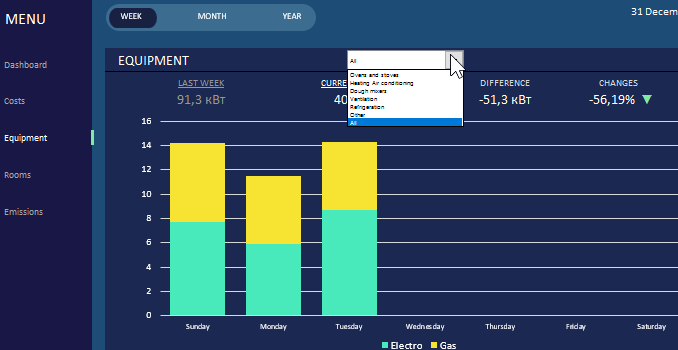 678×350 energy reporting dashboard excel from exceltable.com
  975×635 energy consumption spreadsheet emoncms openenergymonitor community from community.openenergymonitor.org
  1517×759 generator wattage calculator spreadsheet db excelcom from db-excel.com