
Free Small Business Budget Planner Excel Template
Free Small Business Budget Planner Excel Template: A Comprehensive Guide
For small business owners, managing finances effectively is crucial for survival and growth. A well-structured budget is the cornerstone of sound financial management, providing a roadmap for income, expenses, and profitability. While sophisticated accounting software exists, many small businesses, especially those just starting out, find them complex and expensive. A free small business budget planner Excel template offers a practical and accessible alternative.
Why Use an Excel Budget Planner?
An Excel template for budgeting offers several advantages:
- Cost-Effectiveness: The most obvious benefit is that it’s free. This is especially important for startups and businesses operating on a tight budget.
- Familiarity: Many people are already familiar with Excel. This reduces the learning curve and makes it easier to use and customize the template.
- Customization: Excel offers a high degree of customization. You can tailor the template to fit the specific needs of your business.
- Accessibility: Excel is widely available on different operating systems and devices.
- Ease of Use: Pre-built templates are designed to be user-friendly, with clear instructions and formulas.
- Offline Access: Unlike cloud-based solutions, Excel templates can be used offline, providing access to your budget even without an internet connection.
Key Features of a Good Free Budget Planner Template
A robust free small business budget planner Excel template should include the following features:
- Income Projections: A dedicated section to forecast revenue from various sources (e.g., sales, services, subscriptions). This should allow for entering anticipated sales volume and pricing for each income stream.
- Expense Tracking: Detailed categories for fixed and variable expenses (e.g., rent, utilities, salaries, marketing). It should include sections for cost of goods sold (COGS) for businesses that sell products. Break down expenses into manageable categories and subcategories.
- Fixed vs. Variable Expenses: Clearly distinguish between fixed expenses (those that remain relatively constant) and variable expenses (those that fluctuate with sales volume). This separation is critical for accurate forecasting and break-even analysis.
- Cost of Goods Sold (COGS): For product-based businesses, a dedicated section to calculate the direct costs associated with producing and selling goods (e.g., raw materials, direct labor).
- Profit and Loss (P&L) Statement: An automatically generated P&L statement that calculates gross profit, operating income, and net income. This section is vital for assessing overall profitability.
- Cash Flow Statement: A section to track cash inflows and outflows, providing insights into the company’s liquidity. This is different from P&L; it focuses on *when* cash moves, not just revenues and expenses.
- Break-Even Analysis: Functionality to calculate the break-even point, the sales volume needed to cover all costs. This helps determine the sales targets required for profitability.
- Variance Analysis: A mechanism to compare budgeted figures with actual figures, highlighting areas where spending exceeded or fell short of projections. This enables proactive adjustments.
- Scenario Planning: The ability to create multiple budget scenarios based on different assumptions (e.g., best-case, worst-case, most likely). This allows for contingency planning.
- Charts and Graphs: Visual representations of key financial data, such as revenue trends, expense breakdowns, and profit margins. Visualizations make it easier to understand and communicate financial information.
- Clear Instructions: User-friendly instructions and explanations to guide users through the template and explain how to use each feature.
Finding a Suitable Free Template
Many websites offer free budget planner templates. When searching for one, consider the following:
- Reputable Source: Download templates only from reputable websites to avoid malware or poorly designed spreadsheets. Look for sites associated with financial institutions, accounting software providers, or business resource centers.
- Reviews and Ratings: If available, read reviews or ratings from other users to get an idea of the template’s quality and usability.
- Customizability: Ensure the template is easily customizable to fit your specific business needs. Look for unlocked spreadsheets where formulas are visible and modifiable (but be careful not to break them!).
- Compatibility: Check that the template is compatible with your version of Excel.
- Terms of Use: Review the terms of use to ensure you are allowed to use the template for commercial purposes. Some free templates may have restrictions.
Examples of reputable places to potentially find free templates include Microsoft’s own template library (within Excel itself), SCORE (a resource partner of the Small Business Administration), and reputable financial blog sites.
Customizing the Template for Your Business
Once you’ve downloaded a template, take the time to customize it to reflect your specific business.
- Add Your Business Information: Enter your company name, logo, and relevant contact details in the designated areas.
- Customize Income Categories: Add or modify income categories to reflect your specific revenue streams. Be as specific as possible (e.g., “Sales of Product A,” “Consulting Services,” “Subscription Fees”).
- Customize Expense Categories: Adjust expense categories to match your business’s specific expenses. Be comprehensive and include all significant costs. Don’t be afraid to add subcategories for more detailed tracking.
- Set Realistic Assumptions: Carefully review the assumptions used in the template (e.g., sales growth rates, expense inflation rates) and adjust them based on your own research and market conditions. Don’t be overly optimistic.
- Add Formulas as Needed: If the template doesn’t include a specific calculation you need (e.g., calculating sales tax), add the appropriate formula. Make sure you understand the formulas you are adding.
- Format for Clarity: Use formatting options (e.g., colors, fonts, borders) to improve the readability and visual appeal of the template. Consistency in formatting makes the spreadsheet easier to navigate.
Using the Budget Planner Effectively
A budget planner is only effective if used consistently and accurately.
- Regular Updates: Update the budget with actual income and expense data on a regular basis (e.g., weekly, monthly). Don’t let it sit untouched for long periods.
- Accurate Data Entry: Ensure that all data entered into the template is accurate and up-to-date. Use reliable sources, such as bank statements and receipts.
- Variance Analysis: Regularly compare budgeted figures with actual figures and investigate any significant variances. Understand why your actual results differed from your planned results.
- Make Adjustments: Based on the variance analysis, make adjustments to your budget and business operations as needed. Be flexible and willing to adapt to changing circumstances.
- Review and Revise: Review your budget regularly (e.g., quarterly) and revise it as necessary to reflect changes in your business or the market environment. The budget is a living document, not a static one.
- Seek Professional Advice: Consider consulting with an accountant or financial advisor for help in developing and managing your budget. They can provide valuable insights and guidance.
Beyond the Basic Template
As your business grows and becomes more complex, you may need to move beyond a simple Excel template. Consider the following options:
- Upgrade to Paid Software: Explore affordable accounting software options that offer more advanced features, such as automated bank reconciliation, invoice generation, and financial reporting.
- Hire a Bookkeeper or Accountant: Consider hiring a professional to help you manage your finances. They can provide expert guidance and support.
- Integrate with Other Tools: Explore ways to integrate your Excel budget with other tools you use, such as CRM systems or inventory management software.
Conclusion
A free small business budget planner Excel template is a valuable tool for managing your finances effectively. By choosing a template with the right features, customizing it to your specific needs, and using it consistently, you can gain valuable insights into your business’s financial performance and make informed decisions to achieve your goals. While a template might be a starting point, remember to continuously evaluate its effectiveness and consider upgrading to more sophisticated tools as your business grows. A well-managed budget is the foundation for a successful and sustainable small business.
 750×970 small business budget template excel excel pany bud small from db-excel.com
  1598×970 small business budget template excel small business bud from db-excel.com
  918×1188 small business budget template excel corporate bud template from db-excel.com
  992×895 small business budget template excel create bud from db-excel.com
  728×439 small business budget template small business excel from www.heritagechristiancollege.com
 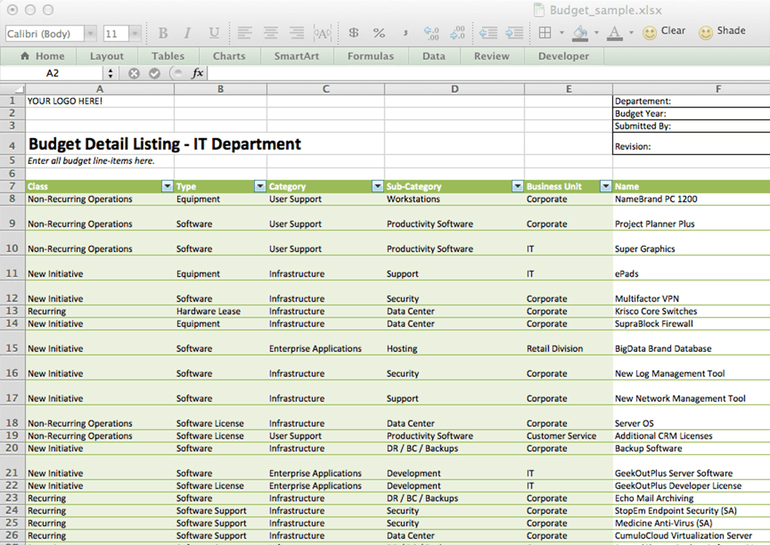 770×545 sample small business budget template db excelcom from db-excel.com
  600×730 business budget templates excel word from www.template.net
  1400×859 small business budget spreadsheet excel monthly yearly budget from db-excel.com
  700×450 business budget templates excelxocom from excelxo.com
  1198×806 small business budget spreadsheet db excelcom from db-excel.com
  1899×2454 small business budget templates db excelcom from db-excel.com
  751×970 business budget spreadsheet db excelcom from db-excel.com